Kvasir is a Scandinavian god of wisdom and online education

Kvasir Exams

From a stack of papers to a graded class.

Upload the assignment, add the students, drop in their work, and run the group. Kvasir reads the submissions, grades them against your materials, keeps the evidence, and lets you inspect any student when you need to.

Scans · typed work · OCR · batch grading · individual review · saved results

Grade the work, not the workflow

Most grading software starts by asking the teacher to build another system: create a class, import a roster, define a complicated rubric, configure an assignment, learn a dashboard, and only then begin working with the papers that were already waiting to be graded. Kvasir Exams starts from the opposite direction. You already have the assignment. You already have the students. You already have their work. Put those things into one exam and start.

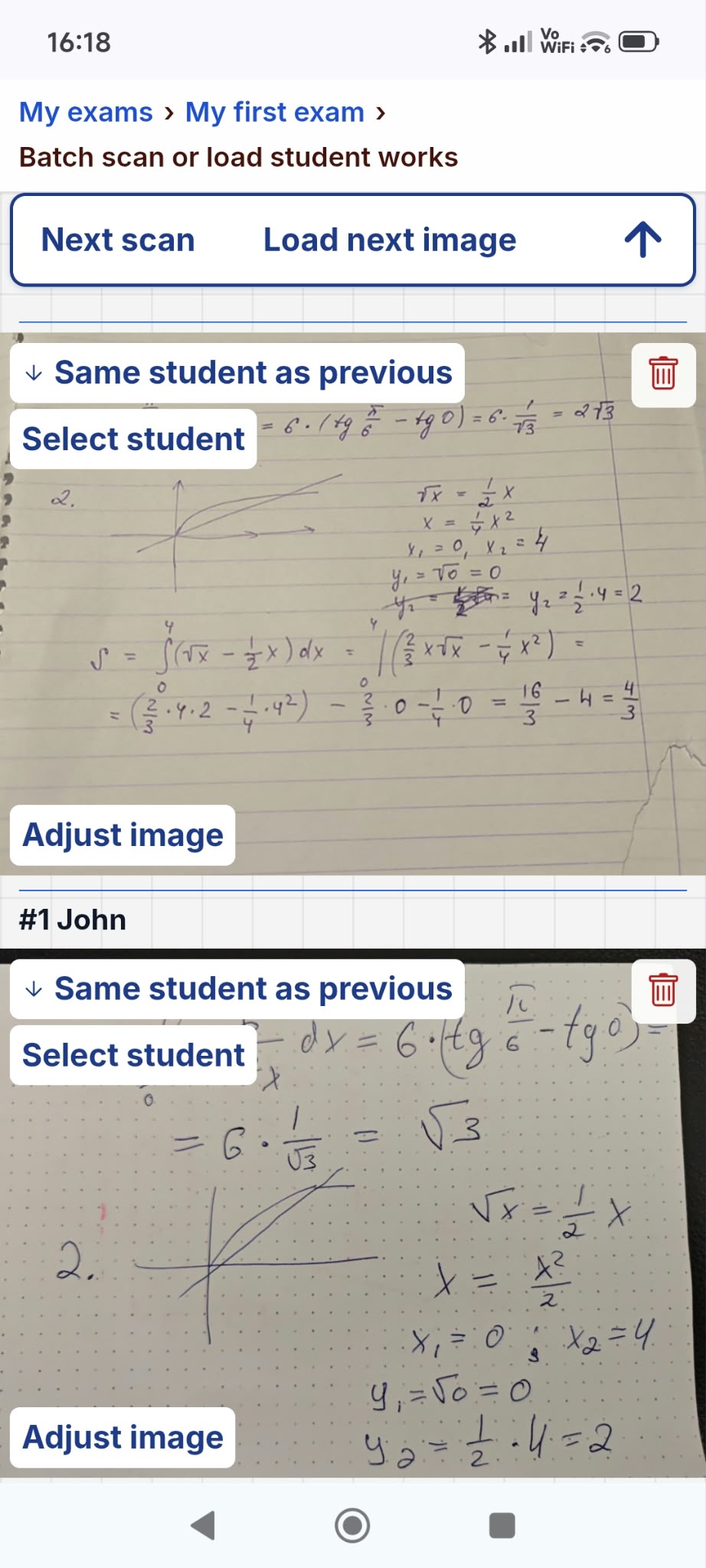
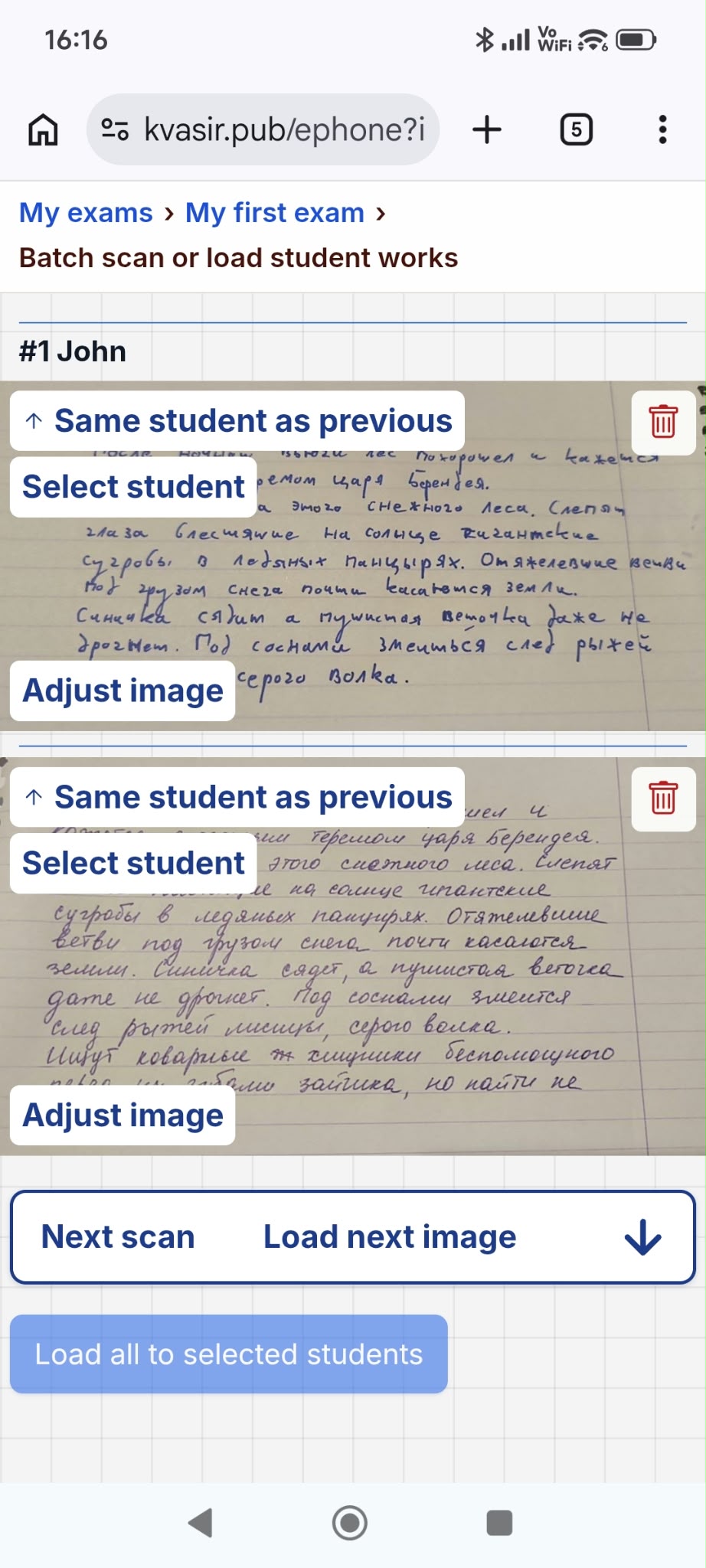
An exam in Kvasir is a simple workspace for the complete grading job. Teacher materials can be entered as text, uploaded as scans, referenced from existing Kvasir materials, or recorded when explaining the task is faster than typing it. Student work can be uploaded as scans or entered as text. Each student can have more than one version, so a corrected submission does not have to overwrite the original one.

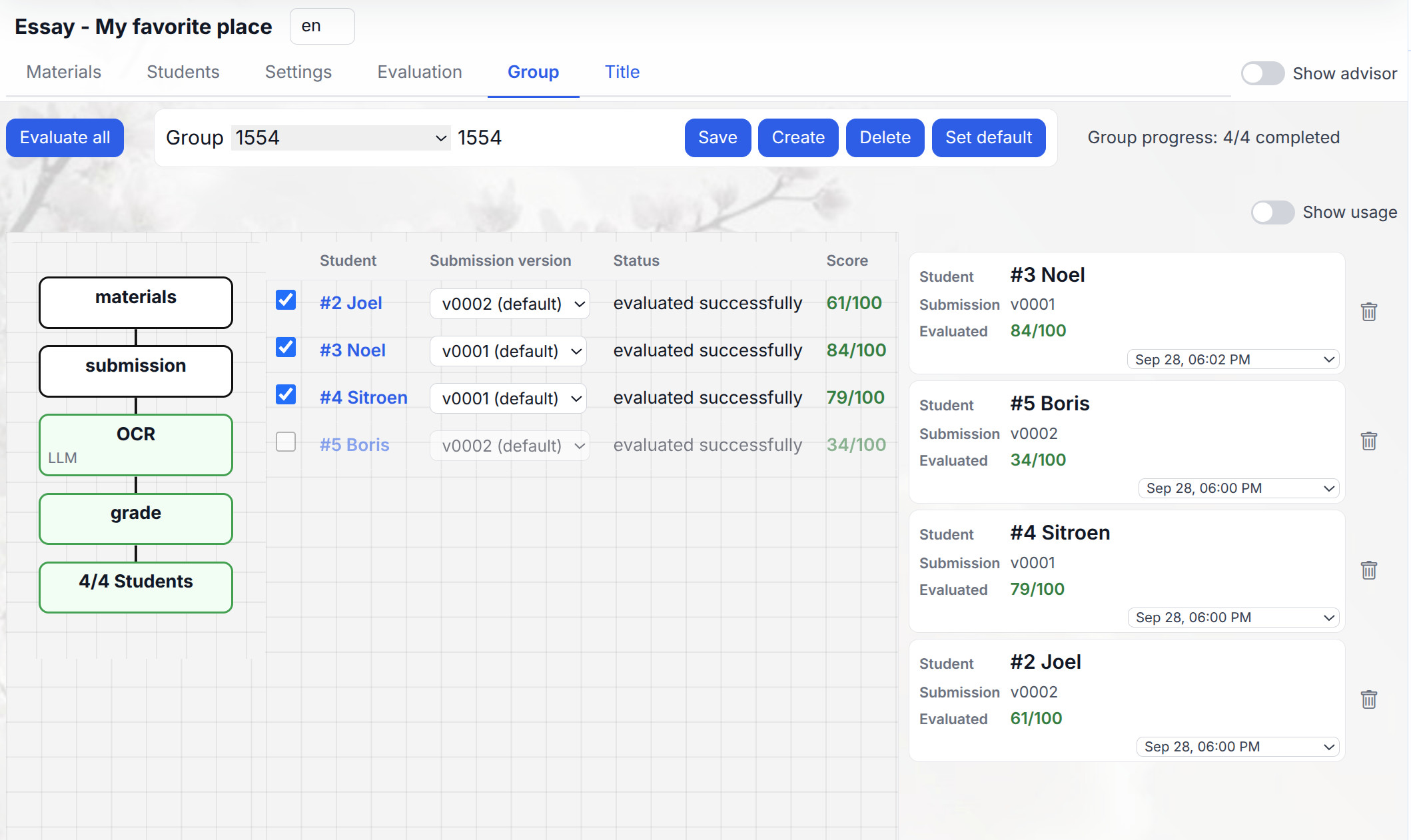
Once the material and submissions are there, Kvasir can process the group in one run. The system recognizes the work, sends the resulting text into the grading stage, records the score and feedback, and keeps the processing result attached to the student. The teacher sees the group first: who has been processed, who has not, and what the score distribution looks like. A single click opens the individual result when closer inspection is needed.

The objective is not to replace the teacher with a dashboard. It is to remove the repetitive part between receiving a pile of work and having a structured first grading pass that the teacher can review, correct, rerun, and use.

There should not be a course in grading software

The central product decision in Kvasir Exams is that ordinary use must remain obvious. There are advanced controls in the system, but they are not allowed to stand between the teacher and the first useful result.

For a normal grading session the workflow is intentionally short. Create an exam. Add the assignment or the materials that explain how it should be graded. Add the students. Upload their work. Press Run all. That is the main path through the product, and every screen should make that path visually clear.

The same principle applies after processing. The default view is the group, because a teacher normally wants to know whether the batch finished and whether the results make sense before studying individual details. Scores are presented as a class-level table and distribution. Clicking a student moves directly into that student's work and result. There is no need to search for a run identifier, reconstruct which submission was used, or open a separate administration screen.

More technical settings are deliberately hidden behind Settings and System settings. A teacher who wants to choose an OCR mode, change a grading model, edit a prompt, inspect usage, or diagnose a failed processing step can do so. A teacher who does not want any of those things does not have to know they exist.

This distinction is important. "Simple" should not mean that the system is incapable of serious work. It should mean that capability appears only when it is useful. Kvasir should feel like handing papers to an assistant, not configuring an AI pipeline.

Scans are input, not a preliminary project

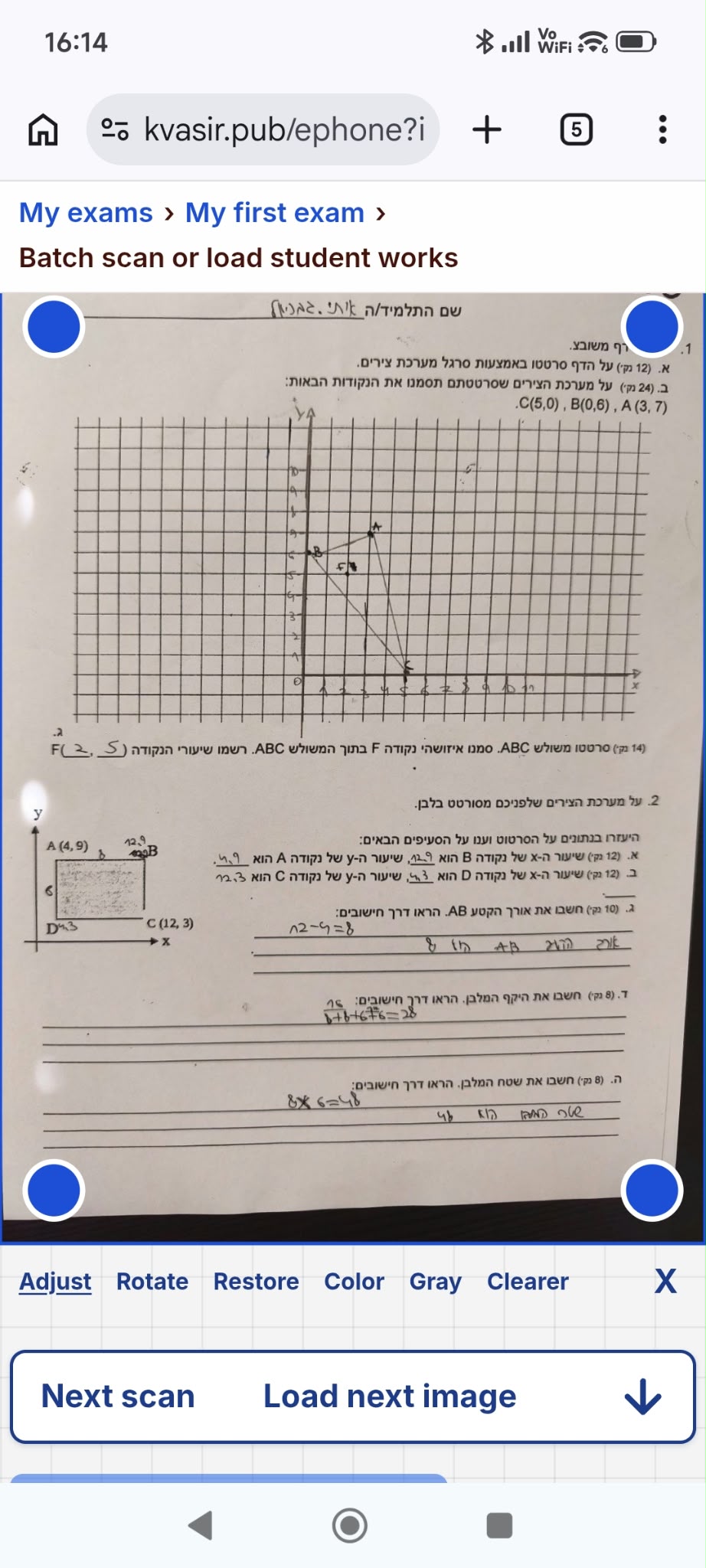
Teachers do not receive student work in one clean machine-readable format. A class may contain photographed pages, exported documents, handwritten answers, typed corrections, several pages per student, and an assignment that itself exists only as a scan. Kvasir Exams is designed around that reality.

A scan can go through inexpensive Google Vision OCR, through direct LLM recognition, or through the hybrid path: Google produces the baseline text and the LLM checks the image and returns only corrections. The corrected text then becomes the canonical version used for grading. The recognition layer is therefore separable from the grading layer. A teacher can choose the cheap path for straightforward material and use the stronger path when the writing or layout demands it.

The same idea applies to teacher materials. A printed assignment does not need to be retyped before it can be used. Upload it, recognize it, and edit the extracted text only if necessary. Existing Kvasir readings can be referenced directly. A spoken explanation can be stored as material when that is the fastest way to capture grading instructions.

Recognition is not treated as a magical black box. Kvasir keeps the resulting text and, in diagnostic mode, the intermediate artifacts needed to understand what happened. If a scan was misread, the teacher can see the text that the grading stage actually received instead of guessing why a result looks strange.

The practical goal is simple: preparing work for AI should not take longer than grading it manually. The software must adapt to the papers, not demand that the papers be reformatted for the software.

Batch work without losing individual judgment

Grading is repetitive at the class level but specific at the student level. Kvasir Exams keeps those two views separate instead of forcing the teacher to choose between automation and detail.

The Group view is the operational center. It shows the students, the submission version being used, processing status, and score. Run all starts the batch while excluded students remain untouched. The teacher can watch the group finish, identify errors, and get an immediate view of the score distribution. The Title page turns the completed work into a compact overview with the exam name, group name, student count, sample material and score histogram.

When a result deserves attention, the teacher moves to Individual mode. The selected student's submission and runs are available without leaving the exam. This is where a questionable score can be inspected, a different submission version can be selected, or a processing stage can be rerun. The result remains connected to the source rather than becoming a number detached from the student's work.

This structure also makes AI safer to use in practice. The system is not asking the teacher to trust 30 independent black-box answers. It is giving the teacher a batch result with enough structure to notice outliers. A suspiciously high score, a failed OCR, an unusual answer, or a student whose result differs sharply from the rest of the class becomes visible quickly.

Automation should remove repetitive attention, not remove accountability. Kvasir handles the repeated processing while preserving the ability to inspect one student as deeply as necessary.

The simple interface has a technical layer underneath it

Different teachers want different levels of control. Some want to upload papers and get a usable first pass. Others want to know which OCR system read a page, which model graded it, what materials were supplied, how a criterion was scored, what the run cost, and what changed after a retry. Kvasir Exams is built to support both without making the second workflow mandatory for the first user.

The normal interface keeps system detail out of the way. Turning on Settings exposes the choices that are useful for configuring the exam. System settings exposes the deeper diagnostic layer. OCR and grading are separate processing stages, so recognition can be changed without redesigning the grading logic. Runs are stored rather than silently replacing one another. Submission versions are explicit. Results can be inspected after the group has finished.

The grading stage can use teacher materials and a rubric when one exists, but a rubric is not a prerequisite for every assignment. The teacher can describe the task in ordinary material and add structured criteria only where structured scoring is useful. This matters for essays and open questions where the assessment is often richer than a fixed multiple-choice-style score sheet.

The current exam workspace also supports exporting the exam for Claude Code. That should remain an advanced escape hatch rather than the main story of the landing page: teachers who want a local or inspectable development workflow can take the structure with them, while everyone else remains inside the web interface.

The product promise is therefore not "AI makes the decision." It is: AI does the repetitive pass; the teacher keeps the evidence, controls and final judgment.

Credits make exam grading cheaper, more flexible and fairer

There is no Teacher subscription, monthly page bundle or fee for adding another teacher. You use Kvasir credits only when the service processes work.

Cheaper for ordinary work

A short typed answer does not cost the same as a long scanned paper. Credits follow the OCR and AI processing used, so simple work stays inexpensive and you never pay for an unused monthly allowance.

Better when the work is difficult

Use economical Google OCR for a clear page, stronger AI recognition for difficult handwriting, or the hybrid route when it adds value. You spend more only where the extra quality is useful.

Fair to every teacher

You are charged for processing, not for having an account, adding students or occupying a “seat.” A teacher grading a small class does not have to subsidize the same fixed plan as someone processing hundreds of papers.