AI Grading with Your Own Course Materials: Essays, Scans and Mathematical Work
A general AI chat can respond to a clean answer pasted into a prompt. A real grading job contains more than one answer. It includes the assignment, the teacher's materials, typed and scanned submissions, several versions of the same work and, often, a complete group of students.
Kvasir Exams keeps all of that in one workspace. The teacher adds the material used in the course, uploads or enters the students' work and chooses whether to process one submission or the whole group.
The result is not detached from its source. The original work, recognized text, processing runs, score, feedback and usage remain available for inspection.
Start with the material you actually teach
Kvasir can use course readings, lecture notes, presentation slides, scanned documents, spoken explanations, problem sets, formulas, worked examples and assignment instructions. Existing Kvasir materials can also be selected without uploading them again.
This is useful for courses that do not rely on a standard answer key. An anthropology field report may need to be read against course texts and the instructions for fieldwork. A sociology essay may use a specific set of sources. A mathematics solution may need the original problem, the permitted formulas and examples of the expected method.
The teacher selects the material used for each processing run. The same material can be reused across several assignments, or a different set can be chosen for a particular task or student.
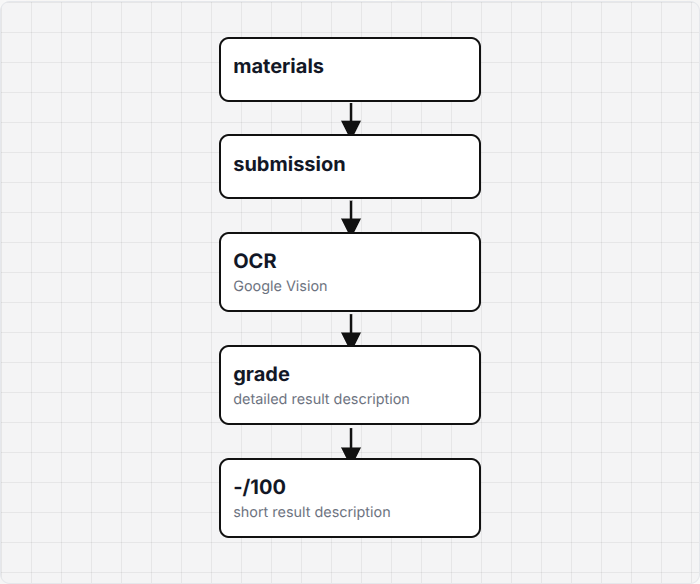
Process text, scans and handwriting
Student work can be pasted as text or uploaded as scans, phone photographs and handwritten pages. Multi-page submissions stay together, and each student can have several submission versions. A corrected answer does not overwrite the earlier one.
For scanned and handwritten work, recognition is a separate model-processing stage. Kvasir can run OCR more than once and aggregate the results when a difficult page needs a more reliable reading. Typed work can go directly to grading.
The original pages and recognized text remain available. If the text was read incorrectly, the teacher can inspect it, change the processing setup and run recognition again before relying on the grading result.
Teacher materials can also arrive as scans. When speaking is faster, an explanation can be recorded by voice and stored with the other course material.
Process one student or the whole group
An exam can be used for one student, but the group workflow is built in. Add students by name or number, attach the active version of each submission and test one or several works before starting a group run.
Students whose work is missing, exempt or not ready can be excluded. The remaining submissions are processed with the same selected materials and assignment setup.
The Group view shows the status and score for every student, together with the score distribution. It contains group runs only. Clicking a row opens that student's detailed result and switches the workspace to Individual mode with the same student already selected.
Individual mode is used to inspect one submission, choose another version, compare previous runs, change settings for that case or run it again.
Keep every result open for inspection
Each stored result can include the original pages, recognized text, score, feedback and source-linked explanations. The teacher can see which submission version and materials were used.
Processing usage is stored with the run. This makes repeated OCR, grading retries and diagnostic runs visible instead of silently replacing the previous result.
You can open public Kvasir Exams examples of graded student work and inspect the original submissions alongside the stored results.
Review signs of AI-generated writing separately
Kvasir can run an optional AI-origin review alongside grading. It is a separate result, not part of the academic score, and it never changes the grade automatically.
The group table can show a short status such as No clear indicators, Review suggested or Insufficient text. Opening the result shows the passages and observations that led to the status.
The purpose is to identify work that the teacher may want to inspect more closely. The academic result and the AI-origin review remain separate throughout the interface.
Use advanced controls only when needed
The normal workflow is short: add materials, add students and submissions, test a few works, run the group and review the results.
Advanced settings are folded away until they are enabled. They can expose source selection, assignment version, OCR passes, result aggregation, diagnostics, model selection, processing usage and stored run history.
Claude Code export is available as an advanced option. It creates a project tree with the relevant exam files for technical users who want to inspect or continue the workflow locally. It is not required for normal grading.
Pay only when processing runs
Kvasir Exams has no monthly grading subscription. Free starting credits typically cover about 200 to 500 student works.
After the starting credits, credits are used only when a model processes work, including OCR, grading and optional review stages. The exact cost depends on the length of the submission and the selected processing setup.
Every run shows its usage and cost. Keeping an account, materials, submissions and stored results does not create a monthly grading fee.
Create an exam, add one or several submissions and check the first results before processing the complete group.